Home Lab
The home lab I've create throughout its 3 years has been amazing through out (even if it did frustrate me from time to time). It's really small however like it doesn't have a custom router or switches. Really it's just a bunch of old hardware smashed up into a functioning SOHO (Small Office Home Office) network.
The Network Gem
Never mind that as the gem of the crown is a server containing 8 10 terabyte hard drives.
If you are used to IT then you know where this is going.
RAID / Operating System
Firstly with an extra NVMe drive for the operating system, I've install Proxmox which is just a Debian based Linux distribution but with a web UI out of the box for remote access. With Proxmox, for managing the 8 drives, I've create a storage pool using the ZFS file system and the type of the pool will be RAIDZ2.
For people who don't know what RAID is, it stands for: redundant array of independent disks.
As the name suggests the point of RAID is to make sure the storage pool has redundancy.
An example would be if one of the hard drives die of some form. Your actual data isn't actually lost.
Depending on the RAID type, it can adjust for more redundancy, more speed, or more storage it just depends on your end needs.
To set up RAID, you can either do it in the BIOS (Basic Input Output System) on the computer's motherboard/on a PCI-E card. This is known as hardware.
For ease of use, I've decided to use software RAID which makes the operating system or in this case; the filesystem to actually handle RAID.
Both do the same job but have different names for the same modes (in this case, RAIDZ2 is RAID6).
As far as I'm aware, Windows' handling of RAID is really bad so people use hardware RAID, but for Linux, since the implementation is really good, software RAID is preferred.
As Proxmox is based of Linux, I've used software RAID.
RAIDZ2 is what I've used which means up to 2 of the 8 drives can stop functioning without data loss. This however decreases the amount of storage I have access going from 80 terabytes to 60 terabytes.
Of course I'm happy with the tradeoff as I get a lot of storage for one person. It's also overkill for my usage but hey, can't be too safe!
Virtual Machines / Containers
I only got one virtual machine that holds everything I host. Simple.
If anything, it's Docker that's more detailed than the actual Virtual Machines in Proxmox
Docker (Services)
The services that I currently host and used in a frequent basis in no particular order:
- Minecraft
- WireGuard (VPN)
- Vaultwarden (Password/Key manager)
- Samba (File sharing)
- Kuma (Monitoring)
- Jellyfin (Media consumption)
Only Minecraft, WireGuard and Vaultwarden are exposed to the internet and Vaultwarden is exposed through Cloudflare's proxy (for DDoS protections among other things).
Everything else is only accessible through LAN or through the VPN, reducing the attack vectors of the network.
It ain't much but It's honest work.
Do I need any more? Yeah Nah.
Other Nodes
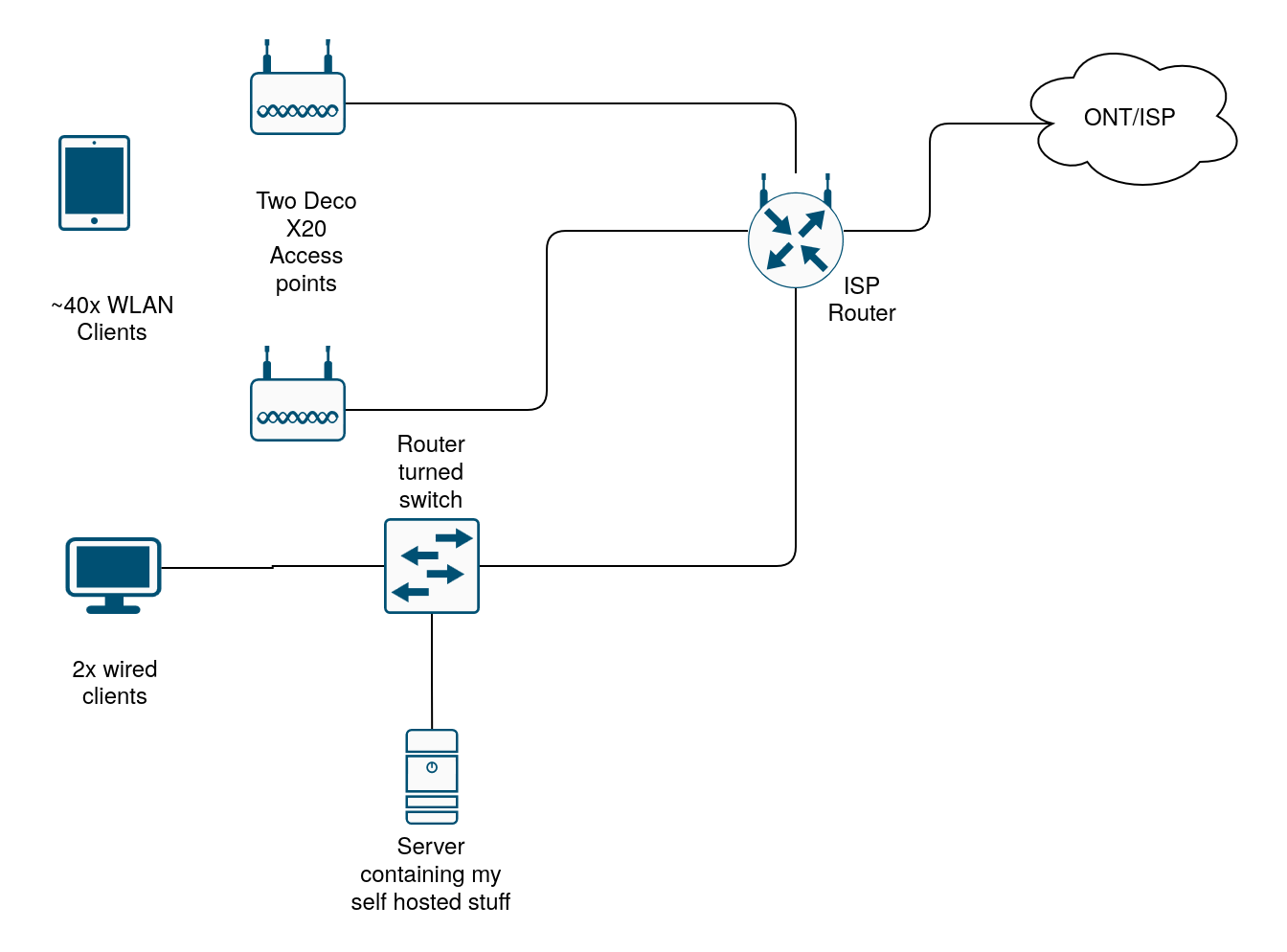
Diagram for referance
Router
It's just an ISP provided router. I wanted to replace it however, due to the requirement from others that there should be a landline present, there is no way I can actually replace it. What a shame since I also wanted to use vlans and such.
The access layer (Switch and access points)
It's a mix of TP-Link Deco X20s and one ISP provided router with DHCP and its routing functions turned off.
- 2x TP-Link Deco X20
- 1x ISP provided router turned switch
What's next?
Well most of the things I want to do are already there, it's one thing to set up the things you need and another to maintain them.
As such, I'll be continuing to maintain my set up till something major occurs.
This has been one of my biggest projects in my life as I've started using virtual machines since year 7 (For y'all american folks that's grade 6).
Ever since I've been chasing my curiosity, from basic computer networking all the way to being a server admin for the services I use for myself and some of my friends.
I h